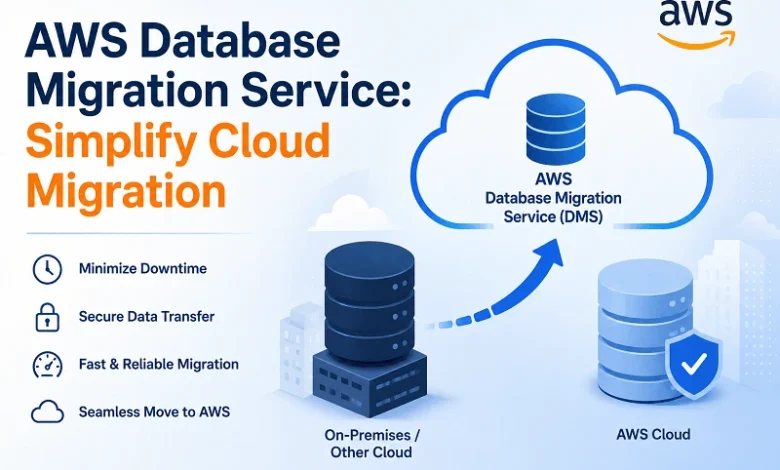
AWS Database Migration Service (AWS DMS) is a managed service that assists you in migrating databases to the cloud in a fast and secure manner and with minimum downtime. Rather than halting business processes in the migration process, it ensures that your data is always up to date, and your applications are still running. This makes cloud adoption faster and less vulnerable.
Imagine reconstructing an airport runway as flights keep taking off and landing safely. Engineers can’t close the runway as it would impact thousands of passengers, flights, and result in the loss of revenue for the aviation companies. The same applies to database migration, where business applications rely on databases every second, and the risk of taking them offline will disrupt the entire business, impacting customer experiences. AWS Database Migration Service is the solution to this. It will migrate your database to the cloud while continually syncing fresh data in the background. The outcome is a smoother migration with less downtime, reduced business risk, and uninterrupted services to the customers.
What are AWS Database Migration Services?
AWS DMS is an entirely managed AWS service that assists businesses in moving databases in, out, or inside the cloud without disrupting the day-to-day operations considerably. Rather than having to close applications during the migration, it will copy your data and then keep a continuous check on the new data until you are ready to change to the new database.
Regardless of whether you are migrating between the same type of database (such as MySQL to Amazon Aurora MySQL) or between different types (such as Oracle to PostgreSQL), AWS DMS makes the process simpler and reduces downtime and the risk of data loss.
Key capabilities of the AWS DMS Service include:
- Near-Zero Downtime: Consists of Change Data Capture (CDC) (a procedure that is used to keep track of and transfer new data changes) to maintain the source and target databases in sync.
- Supports a Variety of Database Types: Supports homogeneous (similar database engine) and heterogeneous (different database engines) migrations.
- Schema Conversion: Works with the AWS Schema Conversion Tool (SCT) to automatically convert your database structure when changing database engines.
- Continuous Data Replication: Replicates changes in real time to continuous data, which is why it is used in migration, disaster recovery, and analytics.
- DMS Serverless: Provisions and scales migration resources automatically based on workload, without manual capacity planning to help optimize costs.
- Broad Platform Support: Works on relational databases, NoSQL databases (databases that support flexible, non-tabular data), data warehouses (systems designed to support large-scale analytics), and a few selected streaming platforms.
Why is Traditional Database Migration Challenging?
Moving data from one server to another is far more than just a simple task of copying data in traditional cloud database migration. Businesses need to transfer vast amounts of essential data while making sure that applications stay online, data accuracy is maintained, and customer experiences aren’t affected.
Typical challenges are:
- Unplanned downtime disrupting business operations.
- Risk of data loss or incomplete transfer.
- Large-scale database migration with extensive windows.
- Incompatibility concerns while transferring across multiple database engines.
- Manual processes adding complexity and risk of error
For enterprises with eCommerce sites, financial apps, healthcare systems, or client portals, a brief outage can result in lost revenue and affect customer experience. This is why enterprises are rapidly turning to AWS Database Migration Services, which automate most of the migration process and limit downtime with continuous replication.
How does AWS Database Migration Service Work?
Before migrating a database, AWS DMS Service adheres to a workflow to securely transfer data and maintain business applications. Instead of transferring all the data simultaneously, it initially transfers the existing data and then constantly updates changes until the target database is completely updated. When proven, it is possible to switch applications to the new environment with minimum downtime.
| Stages of Migration | How it works? |
| Step – 1: Assess & Convert | AWS DMS analyzes your source database before migration. When changing database engines, the AWS Schema Conversion Tool (SCT) can automatically convert database objects, including tables, indexes, and stored procedures into the format used by the target database |
| Step – 2: Move the Existing Data | AWS DMS safely copies your existing database, including tables, records, indexes, and metadata (information about the database structure) to the target database when your applications are still running |
| Step – 3: Synchronize New Changes | In AWS Data Migration, the Change Data Capture (CDC) constantly identifies and copies all new transactions or updates to the target database. This maintains the two databases in sync with little delay till you are ready to change |
| Step – 4: Validate the Migration | Once the synchronization is complete, you may test apps, validate data accuracy, measure performance, and verify that everything works as intended before you direct real traffic |
| Step – 5: Switch to the New Database | After testing, successful applications are forwarded to the new database. Since AWS DMS has already synchronized the latest modifications, the final cutover requires minimal downtime, making cloud database migration smooth and reliable. |

Supported Database Migration Scenarios
One of the main strengths of the AWS Database Migration Service is flexibility. It is compatible with many migration scenarios, whether you are upgrading to a more recent version of the same database, switching to a new database engine, or migrating out of an on-premises environment to AWS. This allows businesses to upgrade their data infrastructure without necessarily having to be constrained by their existing database technology.
Some common migration scenarios include:
| Source Database | Target Database |
| Oracle | Amazon Aurora PostgreSQL |
| SQL Server | Amazon RDS SQL Server |
| MySQL | Amazon Aurora MySQL |
| PostgreSQL | Amazon RDS PostgreSQL |
| MariaDB | Amazon Aurora |
| On-premises databases | AWS cloud databases |
In addition to these examples, AWS DMS Service also supports migrations of relational databases, NoSQL databases (databases designed to store flexible, non-tabular data), data warehouses, and selected streaming platforms. This high compatibility enables organizations to select the best database that suits their business requirements instead of being bound by their current infrastructures; hence, AWS Data Migration projects are more efficient and easier to scale.
What are the Benefits of AWS Database Migration Service?
Migration of a database can only help when it decreases complexity. AWS Database Migration Service assists organizations in a more successful migration process by reducing downtime, automating major migration processes, and guaranteeing the consistency of data in the process.
- Reduced Business Downtime
Data is continuously replicated in AWS DMS and remains accessible, allowing a business to migrate databases with minimal service interruptions and an easier transition to users.
- Lowered Migration Risk
With the source and target databases being kept in sync during migration, AWS DMS facilitates data consistency and minimizes the chances of data loss or transactions being missed.
- Accelerate Cloud Adoption
Automation helps to optimize essential migration processes like data transfer and synchronization, allowing organizations to migrate to the cloud faster and with less manual intervention.
- Cost Optimization
With DMS Serverless, you don’t need to provision migration infrastructure ahead of time, and you pay only for the resources used during the migration.
- Improved Scalability
Once migrated, the organizations will have an opportunity to use the scalable database services of AWS, which will make it easier to address the increasing workload without significant infrastructure modifications.
- Compatible with Various Database Environments
AWS DMS offers migrations across relational databases, NoSQL databases, and data warehouses, helping organizations modernize varied workloads without using numerous migration tools.
When Should You Use AWS Database Migration Service?
If you are migrating databases to AWS, transitioning from one database engine to another, or modernizing your legacy systems, AWS DMS helps make your migration process simple, while keeping your applications functioning.
It’s especially useful when your organization needs to:
- Move on-premises databases to AWS with the least downtime.
- Modify the current database infrastructure to enhance performance and reliability.
- Migrate to another database engine, e.g., Oracle to PostgreSQL or Amazon Aurora.
- Merge several databases into a single cloud system.
- Migrate old applications to a database managed by AWS.
- Create backup disaster recovery setups by replicating data continuously.
- Replicate production data to be analyzed and reported without impacting live workloads.
Ultimately, AWS DMS helps organizations to accomplish migrations more effectively by automating data replication and maintaining the synchronization between the source and target databases, limiting business disruption.
Conclusion
Cloud migration is not merely a matter of transferring data out of one environment to another but rather transferring it without affecting business continuity. AWS Database Migration Service helps ease this burden by integrating automation and continuous replication with wide database compatibility into one migration process. When the migration process is predictable, organizations may devote less time to addressing interruptions and more time to accelerating their cloud objectives.
Frequently Asked Questions
How can AWS Database Migration Service reduce downtime?
Ans: AWS DMS uses Change Data Capture (CDC) to capture and duplicate database changes from the source to the target database on an ongoing basis. This keeps the two databases in sync until the final cutover and allows apps to stay up for much of the migration.
Can I move between multiple database engines using AWS Database Migration Service?
Ans: Yes. AWS DMS enables homogeneous migrations, such as MySQL to Amazon Aurora MySQL, and heterogeneous migrations, such as Oracle to PostgreSQL. It can operate with the AWS Schema Conversion Tool (SCT) to transform database schemas in case of changing database engines.
What is AWS DMS Serverless?
Ans: AWS DMS Serverless is a deployment service that automatically scales migration resources based on the amount of workload. It eliminates manual capacity planning and only charges for the use of compute resources in the process of the migration.
What is the difference between AWS DMS and AWS Schema Conversion Tool (SCT)?
Ans: AWS DMS is responsible for the migration and ongoing replication of data between databases. When migrating from one database engine to another, use the AWS Schema Conversion Tool (SCT) to convert database schemas, code objects, and other database structures. They are typically employed jointly in mixed migration schemes.
Can I use AWS Database Migration Service to perform large-scale database migrations?
Ans: Yes. AWS DMS is built to facilitate migrations from small databases to large workloads. It can replicate massive amounts of data on an ongoing basis, while helping to keep the application available and the data consistent throughout the transfer.
Is AWS Database Migration Service free?
Ans: No, AWS DMS is priced on a pay-as-you-go basis. Your costs depend on the migration instance (or serverless computing), storage, data transport, and how long it takes to migrate.
Can I utilize AWS Database Migration Service for ongoing replication of data?
Ans: Yes, you can. Besides one-time migrations, AWS DMS may also continually duplicate database changes with Change Data Capture (CDC). This makes it useful for disaster recovery, database synchronization, and feeding analytics platforms with near real-time data.