Brief Once, Produce Everywhere: How AI Agents Keep a Video Campaign Consistent Across Every Asset

Every campaign starts consistent. The hero film is signed off, the brand team is happy, and everyone agrees on the look.
Then the asset list arrives. A 30-second cut-down. Three 15-second social edits. Vertical versions. A product-swap variant for another market. A Spanish version and a French one. Somewhere between asset one and asset fourteen, things start to drift. The hero character’s jacket is a slightly different blue. The grade runs warmer in the cut-downs. The end card uses last quarter’s font.
None of these are big mistakes on their own. Together they make a campaign look like it was made by five different teams, which it often was.
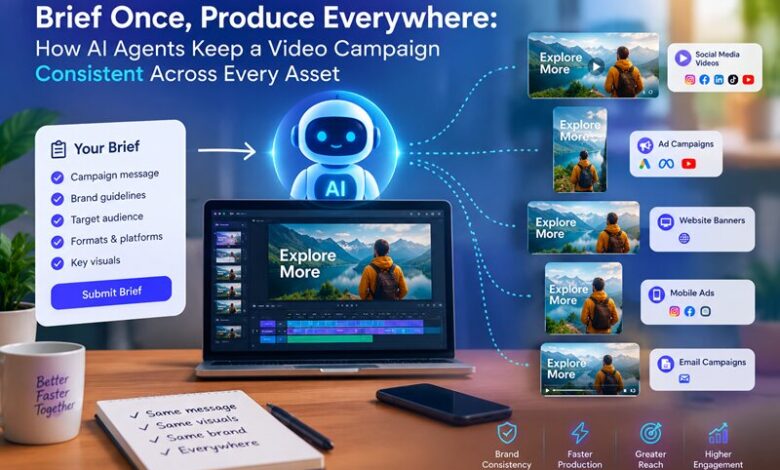
This piece looks at why video campaigns drift, what “consistent” actually needs to cover, and how an AI agent that holds the whole campaign in memory, like invideo Agent, lets you brief once and produce everywhere.
What “consistent” actually means for a campaign
Consistency isn’t one thing. It’s a stack of rules, and each one breaks in a different way.
| Layer | What has to hold | How it usually breaks |
| Characters | Same faces, wardrobe, and performance style | A new tool or model renders them slightly differently |
| World and look | Locations, lighting, grade | Each editor grades by eye |
| Brand | Logo use, fonts, colors, product placement | Old assets get reused from a shared drive |
| Message | Core claim, tone, call to action | Cut-downs lose the setup the line depended on |
| Format | Aspect ratios, lengths, captions | Each version is rebuilt by hand |
The common thread is memory. Every time someone new picks up the work, or the same person opens a new tool, the rules have to be explained again. And every re-explanation is a chance for something to slip.
Why AI made this worse before it made it better
Early AI video tools were built for single clips. You typed a prompt, got a shot, and started from zero on the next one. That’s fine for a one-off. For a campaign, it’s a continuity problem waiting to happen: every clip is a fresh roll of the dice on how your character looks.
The fix isn’t a better prompt. It’s a tool that remembers.
How invideo Agent holds a campaign together
invideo Agent is built around a simple idea borrowed from how large productions run: someone holds the world, and each piece of work has its own crew. Four parts of it matter most for campaigns.


1. Context and Briefs: the brand book and the campaign films
invideo Agent organizes work into two layers. Context holds everything that’s true across the whole project: characters, world, tone, visual rules. Briefs sit inside it, one for each thing you’re making.
For a brand, the mapping is direct:
- Context = the brand book
- Brief = each campaign film
Set the Context up once, and every Brief inherits it. The Spanish cut-down knows the same rules as the hero film because it lives in the same Context. Deep into the project, you can ask how a scene was lit or what the wardrobe rule was, and the agent answers without anything being re-uploaded.
2. It reads the brand book itself
You don’t have to translate your guidelines into prompts. Hand invideo Agent the brand book, reference films, scripts, PDFs, or a Drive folder, and it reads them directly. In invideo’s words, it breaks a brand book down to its DNA, down to the camera lens, so everything it makes carries the brand automatically.
The same applies to your past work. Give it a winning ad and new products, and it can read the ad’s structure, the cuts, the lighting shift, the outfit change, and rebuild it around the new product while keeping everything else.
3. Expert Agents that brief each other
Instead of one general assistant, you can set up a crew of focused agents: a DOP, a casting director, a storyboard artist. They talk to each other. Ask the DOP agent to start a new shot, and it takes the latest from casting and costume before it begins. Ask “what’s the update?” and you get one answer across every department.
For campaigns, this is what stops drift at handoffs. Nobody carries messages between departments, so nothing gets lost in the carrying.
4. Playbooks: the rules that never get forgotten
Some rules aren’t creative choices. They’re how your team always works. Playbooks let you write those down once: approval gates, prompting conventions, whether you’re exploring options or executing a locked plan. The agent follows them every time, on every asset.
Direction is what you say in the moment. A Playbook is how you always work.
The workflow: one brief, every asset
Here’s how a campaign runs when the memory lives in the tool instead of in people’s heads.
Stage 1: Lock the look
Start with a mood board: lighting references, color palette, wardrobe, locations, the camera language you want. Annotate the references with intent. This one is for her face, not the styling. This location is about the light, not the architecture. Add the brand book and the script, and set this all up as the project’s Context.
This is the most important hour of the campaign. Everything after it inherits from here.
Stage 2: Build the hero film
Create a Brief for the hero film. Cast the characters, lock the wardrobe, and work through the storyboard with your crew of expert agents. Use approval gates in a Playbook, for example: headshots first, full-body only on approval, then the character sheet. Nothing moves forward until it’s been signed off.
When the shots are approved, the editor inside invideo Agent can line them up in script order, so you can judge the film as a sequence rather than shot by shot.
Stage 3: Cut-downs and social versions
Each cut-down gets its own Brief inside the same Context. That’s the whole trick. The 15-second edit knows the same characters, grade, and product rules as the hero film, so you’re not re-explaining the campaign to a new tool. Ask for shorter versions of an approved cut, compare them, and keep the ones that land.
Stage 4: Product swaps and new markets
For a variant with a different product, hand over the winning ad and the new product. The agent reads the ad’s structure and rebuilds it around the new product, keeping everything else intact.
For new languages, translate the voiceover and use lip sync so the new audio matches the speaker. The picture, the grade, and the edit stay the same. Only the language changes.
Stage 5: Keep the team in one place
With Multiplayer, your team works inside the same project, with the same Context and the same Briefs. Your producer, your editor, and your brand lead all see the same source of truth, instead of three versions of the brief in three inboxes.